Series: one event, several dates
A weekly club night, a monthly quiz, a run of shows. Set it up once; each date has its own tickets and places.
A series is one event that takes place on several dates. You write the texts, pictures and tickets once; each date then has its own tickets and places, and participants choose their date on your page.
Create a series
Section titled “Create a series”-
Create an event as usual (New event). In Date and place, set the first date and time.
-
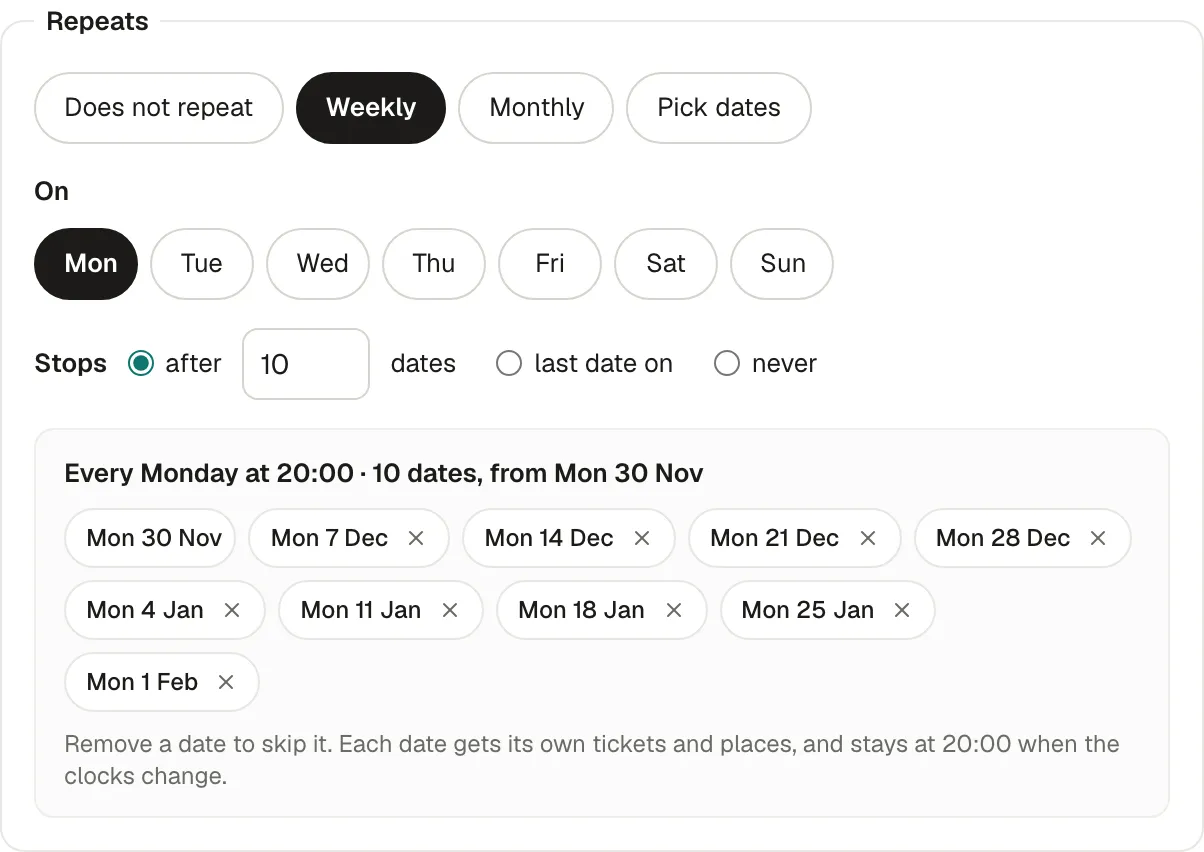
Under Repeats, choose:
- Weekly: on one or more days of the week.
- Monthly: the same weekday each month (“First Thursday of the month”) or the same day of the month.
- Pick dates: any dates, each with its own start time.
-
Stops: after a number of dates, on a last date, or never. With never, new dates are added automatically, up to 6 months ahead.
-
Check the dates below: remove one to skip it (a holiday, a night the venue is closed). Each date stays at the same local time when the clocks change.
-
Continue with the tickets and publish. The series is created with all its dates.
The series page
Section titled “The series page”Open the series from Events: its page shows the totals across dates, a chart of tickets per date, and the list of dates with what each sold, its check-ins and its revenue. From there:
- Add a date: it gets the series’ tickets, texts and pictures, and your followers hear about it.
- Change the rule: the new rule applies from a date you choose; past dates never change. The window lists the dates it adds and removes.
- Skip date or Cancel date on one date.
- Stop after a date: no date after it is created, and later dates without tickets are removed.
- Cancel the series: every upcoming date is cancelled and ticket holders get an email.
Changing one date or all of them
Section titled “Changing one date or all of them”When you change something on a date (its tickets, a picture, the lineup), the admin asks Which dates should get this change?: This date only, This and following dates, or All upcoming dates. Dates where it can’t apply are listed, with the reason:
- tickets already sold never change price: add a new ticket type on those dates instead;
- a quantity never goes below the tickets already sold;
- a ticket type with tickets sold stays on its date.
What participants see
Section titled “What participants see”One page for the series, with its dates to choose from. Each date has its own tickets, places and sold-out state. Their ticket is for one date, and is refused at the door on another.
Why it works this way
Section titled “Why it works this way”- One event, many dates keeps a single page and a single set of texts to update.
- Each date has its own places, so a sold-out night doesn’t close the others.
If something’s wrong
Section titled “If something’s wrong”| What you see | Why | What to do |
|---|---|---|
| These repeat settings don’t give any date. | No weekday chosen, or the last date is before the first. | Check the days and Stops. |
| A weekly series starts on the event’s own day. | The first date’s weekday isn’t among the chosen days. | Pick that day too, or change the start date. |
| A series can have at most 366 dates. | The rule gives too many dates. | Stop it earlier, or choose never (dates are then added 6 months ahead). |
| This date has tickets sold, so it can’t be removed or moved. | Participants hold tickets for it. | Cancel the date instead: they’re told and can be refunded. |
| This date is over and can’t be changed. | Past dates are kept as they were. | Nothing to do. |
| Before publishing, the first date still needs: … | The first date lacks something to be published (description, venue, cover…). | Open the first date and add what’s listed. |
| N dates are kept, they have tickets after changing the rule | Dates that no longer match the rule but have tickets aren’t removed. | Cancel them yourself if they shouldn’t take place. |