Payment methods
Choose how participants can pay, from cards and wallets to local methods like Bancontact and iDEAL.
Participants pay on your event page with the methods turned on in your Stripe account: cards, Apple Pay and Google Pay, and local methods such as Bancontact (Belgium) or iDEAL (the Netherlands). You choose them in your admin, without opening Stripe.
Before you start
Section titled “Before you start”- Stripe is connected.
- Only an owner can change the payment methods. Editors and viewers see them.
-
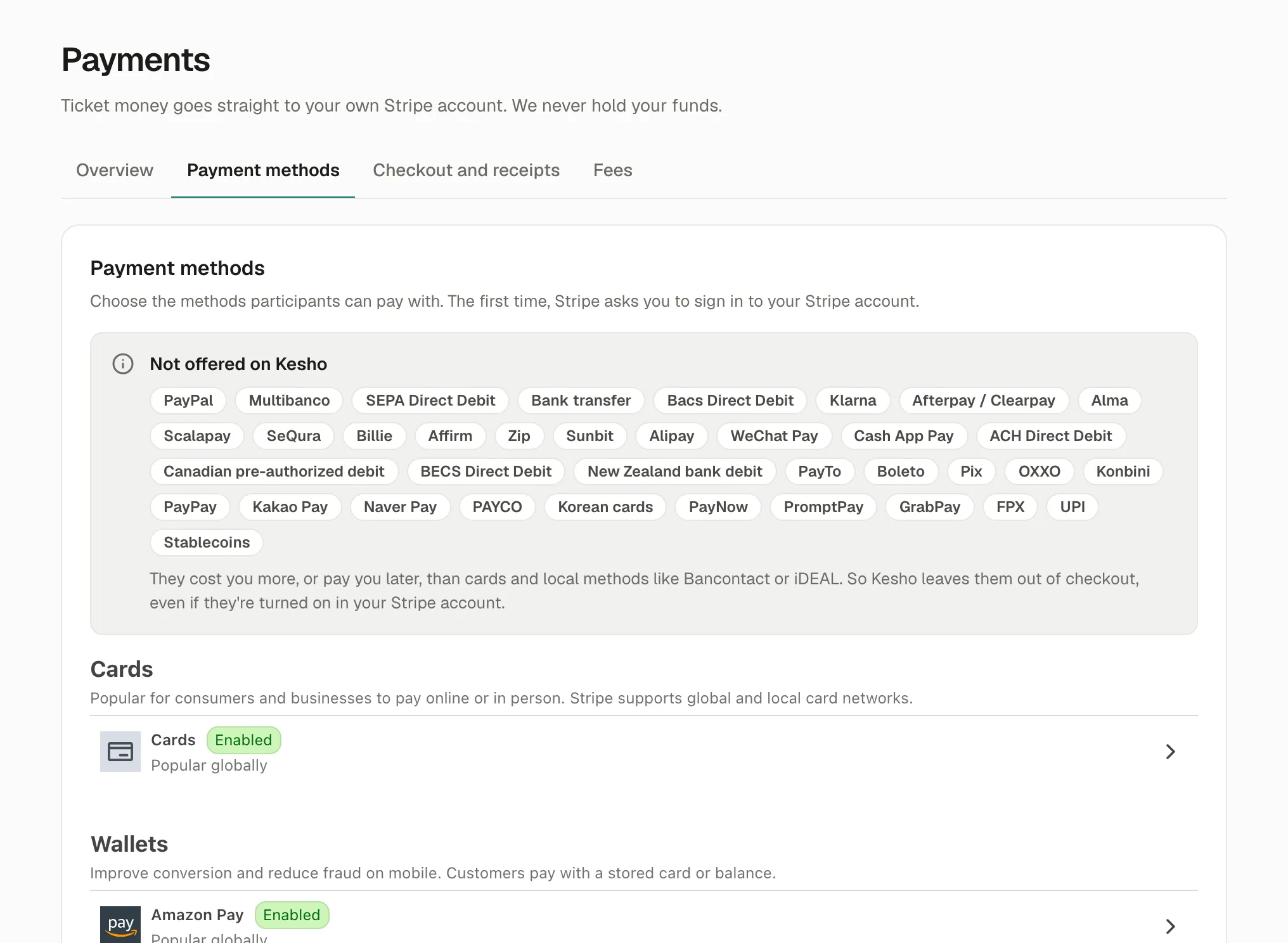
Open Payments › Payment methods.
-
The first time, Stripe asks you to sign in to your Stripe account. It’s Stripe’s own sign-in, inside the page.
-
Open a method to turn it on or off. Changes apply to your next checkouts.
Not offered on Kesho
Section titled “Not offered on Kesho”The grey box at the top lists the methods Kesho leaves out of every checkout, even when they’re turned on in your Stripe account: buy now, pay later services, bank debits and transfers that take days to confirm, and methods from other parts of the world.
They cost you more, or pay you later, than cards and local methods. A transfer that confirms days later also doesn’t fit tickets: the participant needs their ticket now, and the place has to be held meanwhile.
What participants see
Section titled “What participants see”On your event page, participants see the methods that fit their device and country: Apple Pay on an iPhone, Google Pay on Android, Bancontact for a Belgian card, and so on. A method you turned on doesn’t show when it doesn’t fit, for example iDEAL for a participant outside the Netherlands.
Bank methods such as Bancontact and iDEAL open the participant’s banking app or page to confirm, then bring them back to your page.
Why it works this way
Section titled “Why it works this way”- Your Stripe account decides because the money goes to you: Stripe applies its rates and rules to your account.
- Kesho leaves some out to keep checkout simple and cheap for you, and tickets instant for participants.
If something’s wrong
Section titled “If something’s wrong”| What you see | Why | What to do |
|---|---|---|
| Your Stripe settings couldn’t be shown here. | Stripe didn’t answer, or a browser extension blocks Stripe’s part of the page. | Reload the page. If it stays, choose Manage in Stripe to change them in your Stripe dashboard. |
| Stripe asks you to sign in | It’s the first time, or your Stripe session ended. | Sign in with the login of your Stripe account. |
| You can’t change anything | Only owners can. | Ask an owner, or to become one in Settings › Team. |
| A method you turned on doesn’t show for a participant | It doesn’t fit their device, browser or country, or Kesho doesn’t offer it. | Nothing to do: they see the methods that work for them. Cards always work. |
| Apple Pay doesn’t show on an iPhone | The participant has no card in Apple Wallet. | Nothing to do on your side: they can pay by card. |