Refunds
Give money back for some or all tickets of an order, or cancel tickets without a refund. The participant is told by email.
A refund returns money to the participant and cancels the tickets you choose: they stop working at the door. You can refund a whole order or some of its tickets, return less than was paid, or cancel tickets without returning money.
Refund an order
Section titled “Refund an order”-
In Orders, open the order, then choose Refund.
-
Choose what to do:
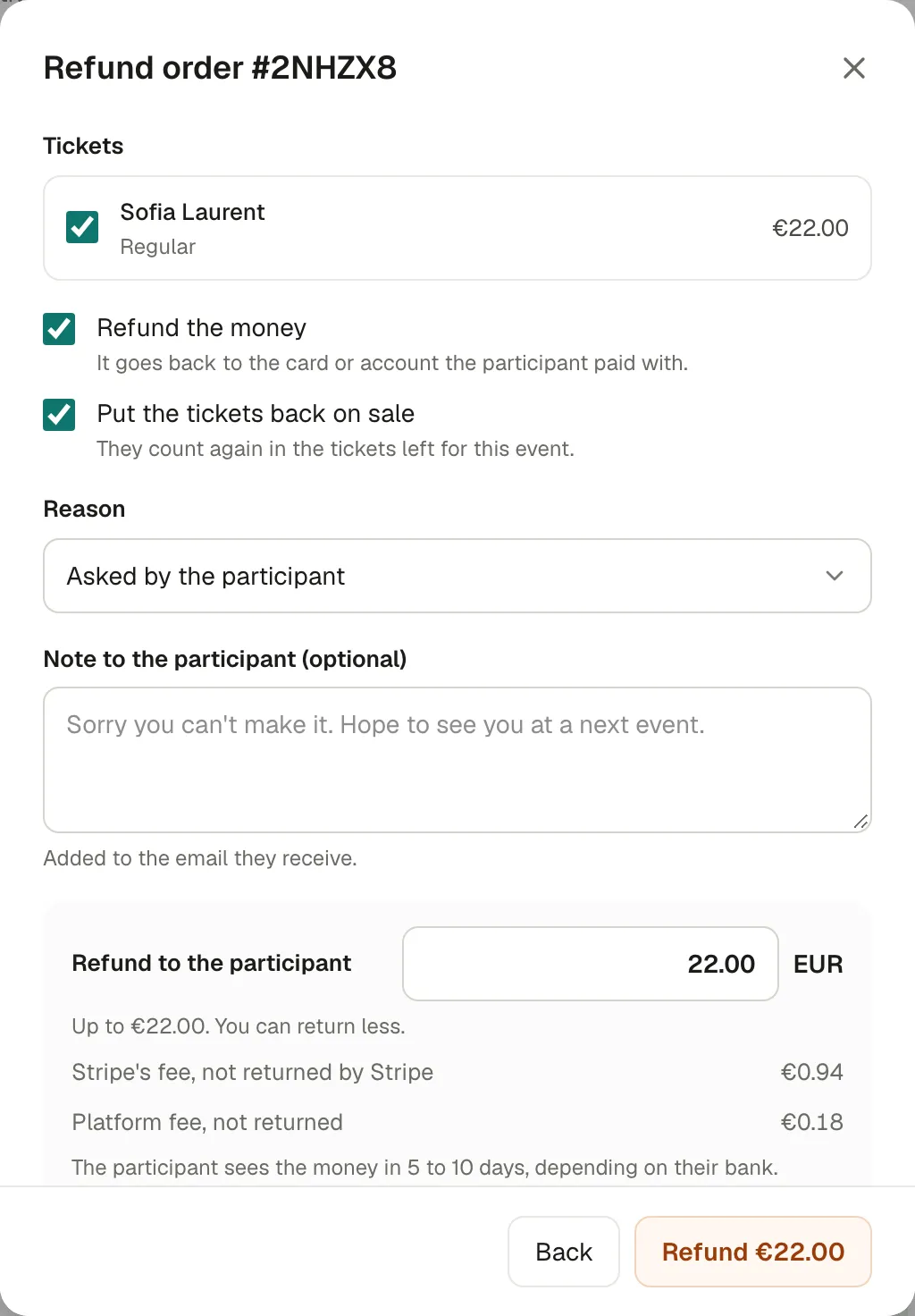
- Tickets: tick the tickets to refund. Each one is cancelled.
- Refund the money: it goes back to the card or account the participant paid with. Untick it to cancel the tickets without returning money.
- Put the tickets back on sale: they count again in the tickets left for the event. Untick it to keep them off sale.
- Also return the support: when the participant added a contribution and you refund every ticket of the order. Off by default.
- Reason: Asked by the participant, Duplicate order, Fraudulent payment or Other.
- Note to the participant (optional): added to the email they receive.
- Refund to the participant: the full amount by default. You can return less, for example to keep a cancellation charge.
-
Check the summary at the bottom: what the participant gets back, and the fees that aren’t returned. Then Refund (or Cancel tickets).
The participant receives an email at once. The money reaches them in 5 to 10 days, depending on their bank.
Fees on a refund
Section titled “Fees on a refund”- Stripe’s fee isn’t returned by Stripe.
- Kesho’s fee isn’t returned either.
Both are shown before you confirm. They come out of your Stripe balance, like the refunded amount.
Tickets already used at the door
Section titled “Tickets already used at the door”A ticket that was scanned at the door can only be refunded by an owner. The window then asks to confirm: This ticket was already used at the door. Refund it anyway.
Refunds made in Stripe
Section titled “Refunds made in Stripe”If someone refunds a payment directly in your Stripe dashboard, the order shows it: €X was refunded in Stripe and every ticket still works. Choose Choose tickets to cancel the tickets it covers, or Keep all tickets if they should still work.
A whole event
Section titled “A whole event”When you cancel an event, an owner can refund every paid order in one go. See Change or cancel an event.
Why it works this way
Section titled “Why it works this way”- The money comes from your Stripe balance, since participants paid you directly.
- Refunded tickets stop working, so nobody gets both the money and the entry.
- Only owners refund used tickets, because the participant already came in.
If something’s wrong
Section titled “If something’s wrong”| What you see | Why | What to do |
|---|---|---|
| This order can’t be refunded: it isn’t paid, or it was already refunded in full. | Free or pending order, or nothing left to refund. | For a free order, use Cancel tickets. |
| One of these tickets was already refunded or cancelled. | Someone refunded it meanwhile. | Reload the order and try again. |
| There is nothing left to refund on these tickets. | They were already refunded in full. | Nothing to do. |
| Only an owner can refund a ticket that was already used at the door. | You’re an editor, and the ticket was scanned. | Ask an owner. |
| Stripe didn’t accept the refund. The tickets still work. | Your Stripe balance is too low, or the card no longer exists. | Check your Stripe dashboard, then try again. |
| Refund pending / At Stripe | Stripe is processing it; some banks take longer. | Nothing to do: the participant is told once it’s done. |
| Failed in the order’s refunds | Stripe couldn’t return the money, for example to a closed card. | The tickets still work. Contact the participant to refund another way, then Cancel tickets without money. |